
Usage guide
Choose an algorithm, benchmark, and harness, or continue below for configuration details.
Configure an experiment
Commands in this guide run from the repository root. The quickstart configuration runs SkillOpt with MiniAgent on a local 12-question QA example, with separate train, dev, and test splits.
Target and Worker use independent model and connection settings:
| Role | Configuration | Responsibility |
|---|---|---|
| Target | agent.llm | Solve benchmark tasks with the selected resource version. |
| Worker | algorithm.worker.llm | Propose improvements, or edit candidate files when using an Agent Worker. |
Set each role's model_name and api_key; set base_url for a custom endpoint. The configuration loader reads literal YAML values. To pass environment variables, expand them in your shell:
uv run flashrsi run --config examples/quickstart.yaml \
  --model "$TARGET_MODEL" \
  --worker-model "$WORKER_MODEL" \
  --agent.llm.api_key "$TARGET_API_KEY" \
  --algorithm.worker.llm.api_key "$WORKER_API_KEY"
Prepare without model calls
uv run flashrsi run --config examples/quickstart.yaml --prepare-onlyThis creates an experiment directory and saves its configuration. It needs no API key and makes no model requests. The local QA example demonstrates the workflow; use full benchmark datasets for research results.
Change the combination
Every configuration field accepts a dotted CLI override. For example, switch the quickstart from skill learning to instruction search:
uv run flashrsi run --config examples/quickstart.yaml \
  --algorithm opro \
  --algorithm.max_steps 1 \
  --algorithm.num_candidates 2
For another harness or task suite, start with a matching configuration:
| Try | Configuration | Environment setup |
|---|---|---|
| Codex as Target and Worker | examples/codex.yaml | See the runtime setup |
| Multi-hop question answering | examples/hotpotqa.yaml | Included |
| Terminal-Bench 2.0 | examples/terminal_bench.yaml | harbor, Python 3.12+, Docker |
| τ³ Banking | examples/tau3_banking.yaml | tau2 and the upstream benchmark |
The all installation includes the Python dependencies for MiniAgent, Claude Code, Codex, the LLM Worker, and all non-Harbor benchmarks. Codex runs its Python core; Code Mode models also need Node.js. Harbor and tau2 need separate environments because their upstream dependencies conflict. See the Terminal-Bench guide, Codex guide, and linked configurations for setup and validation coverage.
Isolated installation
To use a dedicated virtual environment:
python -m venv .venv
source .venv/bin/activate
pip install -e ".[all]"
For uv, use uv sync --extra all instead. Commands below use uv run flashrsi; use flashrsi directly in an activated pip environment.
See also the 30-benchmark configuration index and automatic launcher guide.
Native harnesses
| Harness | Execution | Versioned resources |
|---|---|---|
| MiniAgent | Native Python agent | Instructions, skills, tools, configuration, and declared runtime code |
| Claude Code | Official Agent SDK | Instructions, skills, commands, agents, hooks, MCP/LSP registrations, and settings |
| Codex | Native Codex runtime | Instructions, skills, agents, hooks, MCP servers, plugin bundles, memory resources, rules, and configuration; execution modes are covered in the adapter guide |
Planned adapters: OpenHands, Pi, and Hermes, also previewed in the demo.
The same Agent interface supports a target that solves tasks and a Worker that edits files. A plain LLM Worker is also available for methods that request text or structured edit proposals.
How it works
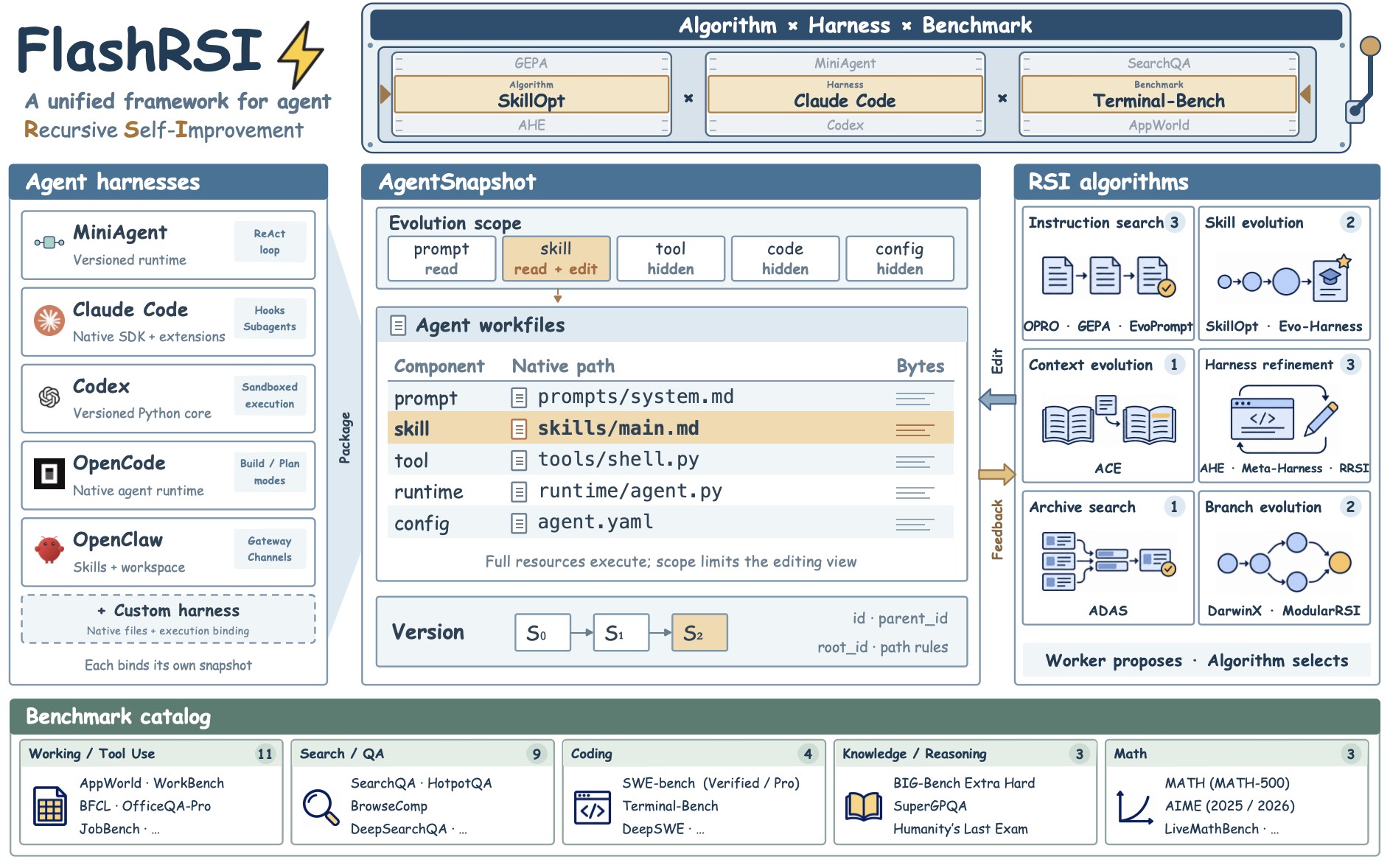
Scoped edits, complete candidates
A skill's effect depends on the instructions, tools, and execution logic around it. A Snapshot records a complete version of the resources declared by the harness. The editing scope controls what an algorithm may read and change; execution retains the surrounding resources.
Native harnesses keep their own resource loading and execution rules. An open harness can expose runtime code; a CLI or SDK harness can expose instructions, configuration, and extensions. Credentials, dependencies, task directories, and runtime state stay outside the resource version.
Shared operations, independent search
OPRO uses a scored history. EvoPrompt maintains a population. SkillOpt combines fast edits with slower guidance updates. They share candidate construction, execution, and scoring facilities, while each algorithm controls its proposal schedule, search memory, and adoption rules.
Evaluating a candidate and activating it are separate operations. A candidate's parent records where its resources came from; the algorithm can use evidence from many versions to propose it.
Feedback during search, assessment after search
Benchmarks supply scores, task outcomes, trajectories, and available usage. Algorithms choose which evidence to use for reflection and selection. The harness determines how an agent runs; the benchmark determines how its work is graded.
When search ends, the runner evaluates the selected Snapshot on the test split. You can also freeze that Snapshot and evaluate it on another benchmark to measure transfer.
Python API
Use the same components directly when building a custom experiment:
import asyncio

from flashrsi.agents import LLM, MiniAgent
from flashrsi.algorithms import SkillOpt
from flashrsi.benchmarks import SearchQA
from flashrsi.config import load_config


async def main():
    config = load_config("examples/quickstart.yaml")
    target = MiniAgent(config.agent)
    worker = LLM(config.algorithm.worker)
    benchmark = SearchQA(config.benchmark)
    algorithm = SkillOpt(
        config.algorithm, target=target, worker=worker, benchmark=benchmark
    )

    selected = await algorithm.evolve()
    results = benchmark.grade(await target.rollout(benchmark.test, snapshot=selected))
    selected.save("snapshot.json")
    print([dict(item.metrics) for item in results])


asyncio.run(main())
For lower-level control, snapshot.check_out() and snapshot.commit() construct a candidate; target.rollout(tasks, snapshot=candidate) evaluates it, and target.update(candidate) selects it for subsequent runs.
Experiment records
Each CLI run creates its own directory:
runs/<algorithm>-<agent>-<benchmark>-<timestamp>/
├── config.yaml           # Saved configuration; credentials redacted
├── snapshots/            # Resource versions and their lineage
├── trajectories/         # Target runs, Worker calls, and search decisions
├── artifacts/harbor/     # Collected deliverables and native logs for Harbor tasks
├── result.json           # Selected Snapshot and final test result
├── end-summary.json      # Machine-readable experiment summary
└── end-summary.md        # Human-readable experiment summary
Scores and trajectories stay associated with the version that produced them. Target and Worker calls are recorded separately, so you can inspect both task behavior and the work spent improving it. Usage follows the accounting exposed by each native harness.
Harbor outputs are archived before temporary trials are removed, including files already collected from failed or normally cancelled attempts. Verifier events link to a unique archive and its manifest; SWE-bench Pro keeps solver and regrade archives separately. Deliverables and patches retain their original bytes; known credentials are redacted from UTF-8 logs and manifests, and trial config/lock/payload files are excluded. Forced process termination is not covered. agent.harbor.artifacts_dir overrides the archive root (relative to the launch working directory); outside the runner it defaults to runs/artifacts/harbor/. Regrading still requires the original task and evaluator environment.
Extend FlashRSI
| Add your own… | Implement | Start here |
|---|---|---|
| Harness | Declare resource components and implement native execution as Agent._run. | Agent integration guide |
| RSI method | Declare editing / observation scopes and organize search in Algorithm.evolve. | Algorithm implementations |
| Benchmark | Supply tasks and grading; bind an environment executor where needed. | Benchmark interface |
A small offline example demonstrates resource checkout, file editing, candidate evaluation, and activation:
uv run python examples/agents/native_adapters.pyIt uses a local subprocess and an explicitly simulated SDK. For detailed earlier implementation records, see the archived notes.
Development checks and image generation
uv sync --extra all
uv run pytest
uv run ruff check .
uv run ruff format --check .
The animated cover uses the bundled electric-logo renderer, with a PNG still, capture instructions, and design notes. The demo GIF is generated from scripts/render_readme_hero.py using Pillow. Its training and evaluation curves are schematic. Images are checked into assets/readme/, so viewing the README needs no renderer.